SPR Smartphone Repair
Force Touch · Glass · Click feel · 4–8 hr · All MacBook

MacBook Trackpad Repair.

MacBook trackpad repair at any of 16 SPR branches across KL & Selangor — cracked glass, dead click, swelling-battery pressure, lost multi-touch. Force Touch haptic trackpads on every 2015+ MacBook; 4 to 8 hours bench time because the trackpad sits under the battery on Apple Silicon. Free pressure test first.

✓ Same-day turnaround✓ 6-month warranty✓ 16 branches, no appointment

MacBook trackpad repair at SPR works around a structural reality: on every Apple Silicon Air and Pro, the trackpad is sandwiched under the adhesive-bonded battery. To replace the trackpad you must first safely lift the battery — same 4-to-8 hour adhesive-release process as a battery swap. The Force Touch mechanism (2015+) uses four force sensors plus a Taptic Engine for the simulated click; cracked top glass and worn-out click sensors are the two most common faults. A swelling battery (especially M1 Air at 3 years) presses up from below and makes the click feel mushy or always-pre-pressed — in those cases we replace the battery first, which usually resolves the trackpad feel for free. The pre-Force-Touch "diving board" trackpads on Pro 2014 and earlier are physically hinged; click failures on those are typically the metal hinge itself. WhatsApp us a photo of the trackpad showing where the glass is cracked, or a video of the click behaviour, and we confirm whether it's a trackpad job or a battery job before you travel.

Trackpad Repair · what it looks like
  • The trackpad glass is cracked or chipped, from a drop or an impact.
  • The trackpad won't click — but first rule out a swollen battery underneath, the most common cause of a Force Touch trackpad that stops clicking.
  • The cursor jumps, drifts or registers phantom clicks and gestures on its own.
  • Clicks register intermittently, feel uneven, or the haptic 'click' feedback is weak or gone (Force Touch is haptic, not a physical hinge).
  • The trackpad went erratic or dead after a liquid spill.
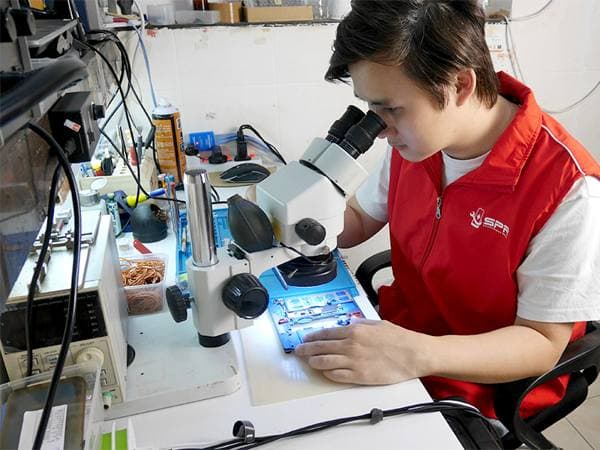
SPR technicians working on phone repairs at the workshop bench
What we check first
  • Lay the MacBook flat and check for any rocking or a lifted case — a swollen battery under the trackpad is the number-one reason it won't click, and that's a battery job, not a trackpad one.
  • Note whether it's a crack, no-click, or erratic cursor — different causes.
  • Try an external mouse — if that's smooth, it confirms the built-in trackpad, not macOS.
  • Recall any spill — liquid under the trackpad changes the repair to a clean-and-check.
Repair path

Counter-to-workshop, typically 4–8 hours. The first thing we check is the battery — on modern MacBooks the battery sits directly under the trackpad, and a swelling battery is the most common reason a Force Touch trackpad stops clicking, so we rule that out before touching the trackpad itself (it'd be a battery repair, not a trackpad one). For a genuinely cracked or faulty trackpad we replace it and recalibrate Force Touch, since the click is haptic — generated by the Taptic Engine, not a physical hinge — and it needs calibrating to feel right. An erratic, jumping cursor can be the trackpad, its flex cable, or again a swollen battery pressing on it, so we diagnose which. Liquid-affected trackpads get cleaned and the board checked for corrosion. We test click, pressure and gestures before returning it, and tell you straight if the real fix is the battery underneath rather than the trackpad.
Not sure what's wrong? Send us a photo — free quote, no fix no charge.

Free WhatsApp diagnosis
Send these on WhatsApp for the fastest quote
  • Exact MacBook model and year.
  • Whether it's cracked, won't click, or has an erratic / jumping cursor.
  • Whether the MacBook sits flat or rocks (swollen-battery check).
  • Whether any liquid was spilled, and whether an external mouse works fine.
Six MacBook trackpad symptoms

Trackpad acting up.
Six things it could be.

Not every trackpad complaint is a trackpad job. Half the time it's the battery beneath it. Free 5-minute diagnosis tells you which.

Cracked or chipped glass top

Visible crack in the trackpad glass surface after a drop or a heavy object on the closed lid. The glass is bonded to the click mechanism — full trackpad assembly replacement, not glass-only.

Click feels pre-pressed all the time

The trackpad feels like it's halfway clicked already, even when you're not touching it. 9 times out of 10 this is a swelling battery underneath pushing up. We check battery health first — replacing the battery usually restores the trackpad without any trackpad work.

Click completely unresponsive

Tap-to-click in macOS Trackpad settings still works (so the touch sensors are alive), but pressing down does nothing. The Force Touch sensors or the Taptic Engine has failed. Full trackpad assembly replacement.

Cursor jumps or moves on its own

Pointer drifts when no one is touching, or jumps to random places mid-typing. Usually a flex cable issue or moisture under the glass. SMC reset on Intel / NVRAM reset on Apple Silicon first (free); hardware repair only if reset fails.

Multi-touch gestures stopped working

Two-finger scroll works, but three-finger swipe doesn't. Or pinch-to-zoom registers as a single click. Trackpad firmware desync after macOS update is the first thing we check (free reset); flex cable replacement second; full trackpad assembly only if the touch IC has failed.

Trackpad clicks sound metallic or loose

Click still registers but sounds wrong — metallic ping, hollow rattle, or one corner clicks differently from the others. The Taptic Engine mounting or the trackpad spring tabs have loosened. Sometimes a re-seat fix; usually full assembly replacement if it's been like that for weeks.

SEC-03 / GUARANTEES · Why SPR

Six reasons for trackpad repair. Every repair.

P-01ACTIVE

30-minute turnaround

Walk-in screen and battery jobs done in 30–60 minutes. Take your phone home the same day.

P-02ACTIVE

OEM-grade parts

Manufactured to the same specifications as the originals. Premium-grade upgrade available on request.

P-03ACTIVE

No fix, no fee

Free walk-in diagnosis at every branch. If we cannot repair it, you pay nothing — no diagnostic fee.

P-04ACTIVE

6-month warranty

Every repair covered for 6 months on parts and labour. Honoured at all 16 branches.

P-05ACTIVE

16 walk-in workshops

KL and Selangor coverage. Walk into the workshop nearest to you — no appointment needed.

P-06ACTIVE

60+ in-house technicians

Every repair carried out by our own technicians at ESD-safe workstations. 17 years doing one thing only.

SEC-04 / PIPELINE · How it works

Four steps. Zero hassle.

STEP-015 min
Intake

Snap a photo

WhatsApp the damage + your device model. We reply within 5 minutes.

STEP-0210 min
Diagnosis

Get a quote

Transparent pricing before you commit. OEM-grade and premium options explained.

STEP-0330–90 min
Repair / BAY 02·03

Walk into a branch

Drop in at any of 16 workshops. No appointment. Free diagnosis on arrival.

STEP-04Same day
QC + Pickup

Take it home

Most repairs done the same day. 6-month warranty included on every fix.

SEC-05 / WORKSHOP FEED · REC · Inside the workshop

ESD-safe benches. Every branch.

Every repair happens on grounded anti-static workstations with calibrated tools and microscope inspection. 16 workshops, same setup.

SPR technician at ESD-safe workstation under microscope
REC · CAM-01
BAY 03
KPG · Kepong HQ
SPR repair bench tools
REC · CAM-02
BAY 02
SPL · Sri Petaling
Smartphone display test jig
REC · CAM-03
BAY 04
UTD · Uptown Damansara
SPR parts storage
REC · CAM-04
STK
PKN · Puchong Kenari
Technician replacing a component
REC · CAM-05
BAY 03
TSG · Taman Segar
SPR counter at a branch
REC · CAM-06
Intake
AMP · Ampang
Other MacBook issues

Something else wrong?
We cover all of these too.

Trackpad Repair is one of 6 repair categories we handle for MacBook. Tap any below to read up on that specific repair.

By MacBook generation

Every MacBook.
Every generation.

From MacBook Air M1 through the latest Pro M5 Max — series-specific repair notes for the model you're holding.

SEC-08 / SUPPORT · Questions

Before you walk in.

Common questions. For unlisted cases, contact SPR support directly via WhatsApp.

Q.01My MacBook trackpad won't click — does it need a new trackpad?[+]
└─ Often not. The most common cause of a Force Touch trackpad that won't click is a swollen battery directly underneath it pushing up and jamming it — that's a battery repair, and the trackpad starts clicking again once the swollen cell is replaced. We always check the battery first. Only if the trackpad itself is cracked or faulty do you need a trackpad replacement. The free diagnosis tells you which, so you don't replace the wrong part.
Q.02My MacBook cursor jumps around and clicks on its own — what's wrong?[+]
└─ That erratic, phantom-click behaviour is usually the trackpad or its flex cable, sometimes triggered by a swelling battery pressing on the trackpad from below, and occasionally a liquid-spill residue. We diagnose which — a flex reseat or replacement, a trackpad replacement, or a battery if it's swelling. An external mouse test helps confirm it's the trackpad and not macOS before any work.
Q.03Can you replace just the trackpad glass if it's cracked?[+]
└─ On most MacBooks the trackpad is replaced as a unit (glass plus the Force Touch mechanism), because the click is haptic and the sensor and glass are integrated — a glass-only swap isn't reliable. We fit the trackpad assembly and recalibrate Force Touch so the click feels right. We confirm your exact model's part before quoting.
Q.04Where can I get macbook trackpad repair near me in KL or Selangor?[+]
└─ SPR has 16 walk-in branches across Kuala Lumpur and Selangor — Kepong, Uptown Damansara, Puchong Kenari, Sri Petaling, Taman Segar, Setapak, Mahkota Cheras, Pandan Indah, Ampang, Mid Valley, IOI City Mall, Sungai Wang, Maluri, Equine Park, Taipan USJ, and Kuchai Lama. Walk into any branch — no appointment needed — or WhatsApp us a photo of your MacBook first to confirm parts at the branch nearest you.
Q.05How long does macbook trackpad repair take?[+]
└─ Typically 4–8 hr at any of our 16 branches. Walk in without an appointment, or WhatsApp us your model to confirm stock first.
Q.06Which MacBook models are covered?[+]
└─ Every MacBook from 2015 onwards — MacBook Air M1/M2/M3, MacBook Pro 13/14/16 Intel and Apple Silicon (M1, M2, M3, M4).
Q.07What does macbook trackpad repair cost in Malaysia?[+]
└─ Cost depends on the MacBook model and the parts tier you choose. We don't post fixed prices because every case is different. WhatsApp us a photo of the damage and the model and we send a free quote within minutes. No charge for diagnosis if you walk in.
Q.08Is SPR an Apple Authorised Service Provider?[+]
└─ No — SPR is independent. We're not Apple, not an Apple Authorised Service Provider, and we don't claim to be. We've been repairing Apple devices for 17 years across 16 branches in KL and Selangor. If you specifically want Apple-genuine parts and an Apple-issued service record, your only option is Apple's own out-of-warranty service. If you want fast same-day independent repair with a 6-month warranty at independent shop pricing, that's us.
Q.09What warranty do I get?[+]
└─ Every trackpad repair at SPR comes with a 6-month warranty on parts and labour, honoured at all 16 branches across KL and Selangor — bring it to any SPR location for warranty work, not just the branch where the repair was done. Water-damage repairs carry a shorter warranty due to the unpredictable progression of corrosion.
Q.10What kind of replacement parts do you use?[+]
└─ OEM-grade parts as standard — manufactured to the same specifications as the originals. Premium-grade options are available on request for most models. We show you both tiers upfront so you can choose what fits. Apple does not sell parts to repair shops, so no independent shop in Malaysia can offer Apple-genuine parts; anyone claiming so is misleading.
Q.11Do you offer a free diagnosis?[+]
└─ Yes. Free diagnosis on walk-in at every branch. If we cannot repair your device, you pay nothing — no diagnostic fee, no consultation charge. Many fixes (lint cleaning, ultrasonic cleaning, software-only) cost nothing if that's all that's needed.
Button / keyboard / trackpad / crown repair · other Apple devices

Same issue. Different Apple device?

Trackpad Repair sits in a wider Apple repair cluster — the same fault pattern shows up on other Apple devices, with the same SPR approach. Pick the device you have:

SEC-07 / QA AUDIT

Don't take our word. Take theirs.

Google
4.9★★★★★
N=2,200+
Facebook
4.7★★★★★
N=720+
RVW-001Verified
★★★★★

Brought in my iPhone 13 after it took a swim in the pool. Two other shops said replace the phone. SPR Kepong ultrasonic-cleaned the board overnight and it's been working perfectly — that was six months ago.

C
── Mr Chen K.M.
Kepong · Water damage · 2026
RVW-002Verified
★★★★★

Samsung S23 had the dreaded green line. Three shops said the whole OLED panel needed replacing. SPR Uptown did the green-line correction in 90 minutes. Warranty honoured, no pressure sell on extras.

A
── Aisyah R.
Uptown Damansara · Green line · 2026
RVW-003Verified
★★★★★

MacBook Pro battery swollen after four years. Walk-in at Mid Valley Express, OEM-grade replacement done same day while I had lunch. Clear warranty, no surprises.

R
── Raj S.
Mid Valley · MacBook battery · 2026
SEC-09 / RESERVE A SLOT

MacBook Trackpad Repair. Walk in. Same day.

Trackpad Repair at any of 16 SPR branches across KL & Selangor. WhatsApp us a photo and we'll confirm stock + quote in minutes.

Phone broken?
Free WhatsApp quote · No fix, no fee
WhatsApp