SPR Smartphone Repair
WhatsApp
iPhone 15 · 24–72 hr · 16 branches

iPhone 15 Memory Upgrade.

iPhone 15 storage upgrade swaps the NAND to lift 128GB to 256GB or 512GB — board-level at Kepong HQ. Back up first; data restores from your backup.
24–72 hr6-month warrantyNo fix, no charge
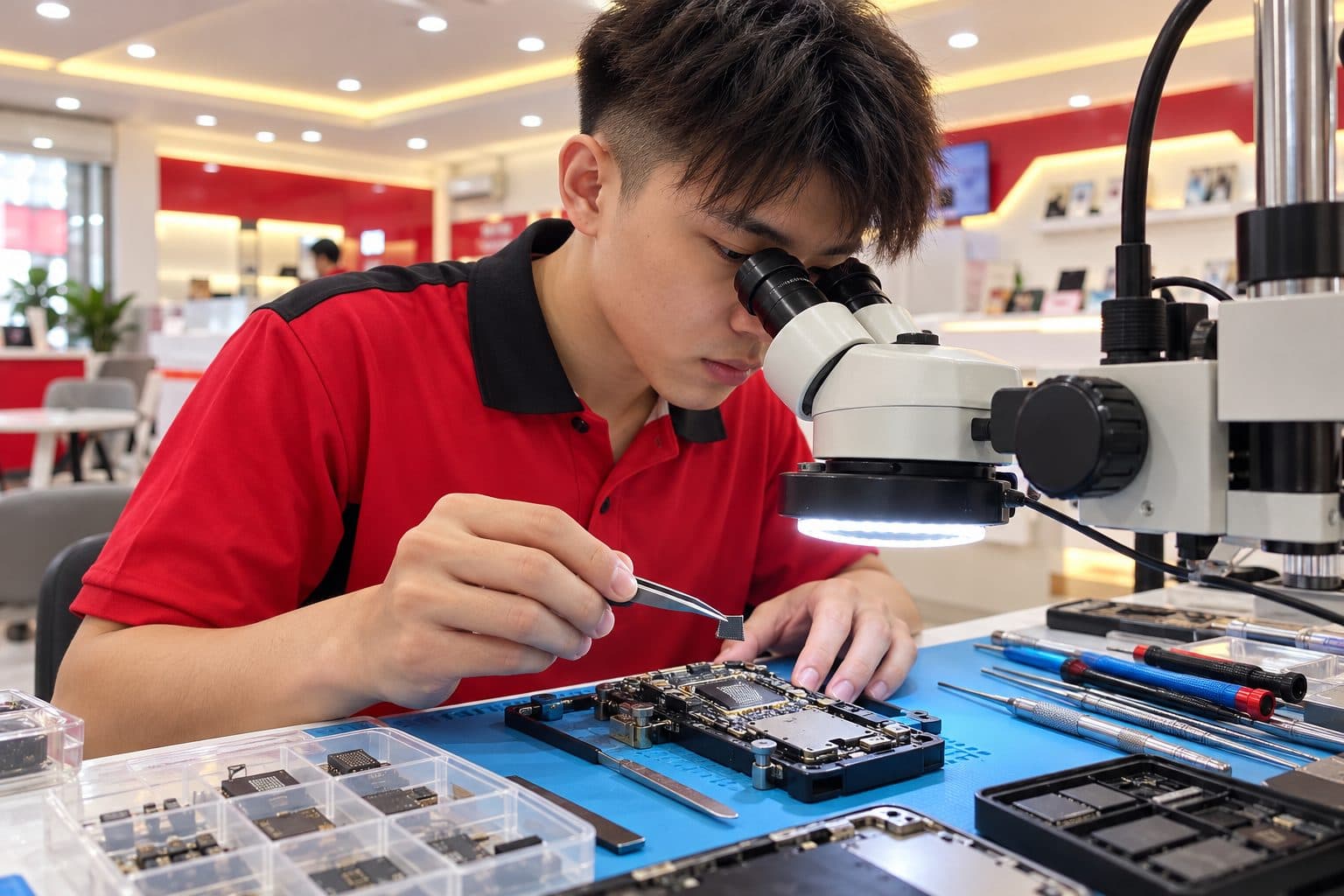
Phone logic board under rework with a storage chip lifted by tweezers, chip trays beside
Memory Upgrade · what it looks like on iPhone 15
Want more storage (64GB → 256/512GB)
'Storage Almost Full' constantly
Boot loop (suspected NAND fault)
Full symptom details
  • You're constantly out of space — 'Storage Almost Full' — on a 64GB or 128GB iPhone and want more capacity without buying a new phone.
  • You want to expand a 64GB to 256GB, 512GB or 1TB by swapping the NAND chip.
  • The iPhone is stuck in a boot loop or won't get past the Apple logo, and diagnosis points to a failing NAND chip.
  • Storage errors, apps crashing on save, or photos failing to write — signs of a degraded NAND.
  • You bought a smaller-capacity model second-hand and want it upgraded.
About this repair & all variants

iPhone 15 memory upgrade at SPR typically takes 24–72 hr at any of our 16 walk-in branches in Kuala Lumpur and Selangor. Every iPhone 15 variant is supported: iPhone 15 · 15 Plus · 15 Pro · 15 Pro Max. Memory Upgrade is one of the repair categories we see most often on iPhone 15 in 2026. Free diagnosis on walk-in, free quote on WhatsApp, 6-month warranty on parts and labour, honoured at all 16 branches.

iPhone 15 storage upgrade swaps the NAND to lift 128GB to 256GB or 512GB — board-level at Kepong HQ. Back up first; data restores from your backup. All variants covered: iPhone 15 · 15 Plus · 15 Pro · 15 Pro Max. Walk into any of 16 SPR branches across KL & Selangor — no appointment needed — or WhatsApp us a photo first for a free quote.

How iPhone 15 memory upgrade actually goes

Board-level micro-soldering at our Kepong HQ, typically 24–72 hours, and it's precision work. We remove the existing NAND flash chip from the logic board and fit a higher-capacity one, then re-program it with the phone's original identity data (syscfg) so that iCloud, Face ID / Touch ID and the phone's serial all keep working — done correctly, the iPhone treats the new larger storage as its own. The same process repairs a failed NAND that's causing a boot loop. Two honest points: first, this replaces the storage chip, so you must have a backup — the old data doesn't transfer and is restored afterward from your iCloud or computer backup. Second, it's intricate board-level work, so we're upfront about whether it's worth it for your specific model versus other options. We confirm the model, the target capacity and that your data is backed up before starting, and the diagnosis is free.

What we check first on your iPhone 15
  • Back up everything first (iCloud or a computer) — a NAND swap replaces the storage chip, so the existing data does not carry over and must be restored from backup.
  • Confirm the current and target capacity (e.g. 64GB to 256GB) — it sets the chip and the cost.
  • If it's a boot-loop, note whether it followed a failed update or happened on its own — helps separate a NAND fault from software.
  • Decide whether you genuinely need it — for some phones a cloud-storage plan or clearing space is simpler; we'll give you the honest view.
By iPhone 15 variant

Memory Upgrade differences by variant.

iPhone 15Aluminium frame; simpler back-glass replacement than Pro variants.
iPhone 15 PlusLarger battery, slower wear; lower battery-replacement walk-in rate.
iPhone 15 ProFirst-gen titanium frame on iPhone — adds disassembly time on back-glass and frame work.
iPhone 15 Pro MaxLargest 15-series cell; often first to need battery replacement in the 15 family.
Free quote on WhatsApp
No fix, no charge
WhatsApp SPR — iPhone 15 Memory Upgrade
Send these on WhatsApp for the fastest iPhone 15 quote
  • Exact iPhone model and its current storage capacity.
  • The capacity you want to upgrade to (256GB / 512GB / 1TB).
  • Whether it's an upgrade, or a boot-loop you suspect is a NAND fault.
  • Whether your data is already backed up to iCloud or a computer.
SEC-04 / PIPELINE · How it works

Four steps. Zero hassle.

STEP-015 min
Intake

Snap a photo

WhatsApp the damage + your device model. We reply within 5 minutes.

STEP-0210 min
Diagnosis

Get a quote

Transparent pricing before you commit. OEM-grade and premium options explained.

STEP-0330–90 min
Repair / BAY 02·03

Walk into a branch

Drop in at any of 16 workshops. No appointment. Free diagnosis on arrival.

STEP-04Same day
QC + Pickup

Take it home

Most repairs done the same day. 6-month warranty included on every fix.

16 Branches
Locations

16 branches.
One always nearby.

Walk in during opening hours. No appointment needed. Each branch is owned and operated by SPR — same standard everywhere.

SEC-07 / QA AUDIT

Don't take our word. Take theirs.

Google
4.9★★★★★
N=17,000+
Facebook
4.7★★★★★
N=720+
Google total across all 16 SPR branches
RVW-001Verified
★★★★★

Brought in my iPhone 13 after it took a swim in the pool. Two other shops said replace the phone. SPR Kepong ultrasonic-cleaned the board overnight and it's been working perfectly — that was six months ago.

C
── Mr Chen K.M.
Kepong · Water damage · 2026
RVW-002Verified
★★★★★

Samsung S23 had the dreaded green line. Three shops said the whole OLED panel needed replacing. SPR Uptown did the green-line correction in 90 minutes. Warranty honoured, no pressure sell on extras.

A
── Aisyah R.
Uptown Damansara · Green line · 2026
RVW-003Verified
★★★★★

MacBook Pro battery swollen after four years. Walk-in at Mid Valley Express, OEM-grade replacement done same day while I had lunch. Clear warranty, no surprises.

R
── Raj S.
Mid Valley · MacBook battery · 2026
SEC-08 / SUPPORT · Questions

Before you walk in.

Common questions. For unlisted cases, contact SPR support directly via WhatsApp.

Q.01Where can I get iPhone 15 memory upgrade near me in KL or Selangor?[+]
└─ SPR has 16 walk-in branches across KL and Selangor — Kepong, Uptown Damansara, Puchong Kenari, Sri Petaling, Taman Segar, Setapak, Mahkota Cheras, Pandan Indah, Ampang, Mid Valley, IOI City Mall, Sungai Wang, Maluri, Equine Park, Taipan USJ, and Kuchai Lama. No appointment needed. WhatsApp us a photo of your iPhone 15 first to confirm which branch has parts in stock for memory upgrade.
Q.02How long does iPhone 15 memory upgrade take?[+]
└─ 24–72 hr at most SPR branches for iPhone 15. Walk in without an appointment, or WhatsApp us first to confirm parts at the location nearest you. All iPhone 15 variants are covered: iPhone 15 · 15 Plus · 15 Pro · 15 Pro Max.
Q.03What does iPhone 15 memory upgrade cost in Malaysia?[+]
└─ We don't post fixed prices because cost depends on which iPhone 15 variant (iPhone 15 · 15 Plus · 15 Pro · 15 Pro Max), the parts tier you choose, and whether any secondary damage is involved. WhatsApp us a clear photo of the issue and the exact model — we send a free quote within minutes. No charge for walk-in diagnosis.
Q.04What warranty does SPR give on iPhone 15 memory upgrade?[+]
└─ Every iPhone 15 repair includes a 6-month warranty on parts and labour, honoured at all 16 branches across KL and Selangor. Bring the device to any SPR location for warranty work. Motherboard and water-damage repairs carry shorter warranties due to the unpredictable progression of underlying damage — we explain the terms before any work starts.
Q.05Will I lose my data when you upgrade the iPhone's storage?[+]
└─ The chip swap itself replaces the storage, so the data on the old NAND doesn't carry over — that's why a full backup (iCloud or computer) before the job is essential. After we fit and program the new chip, you restore your data from that backup. We won't start a memory upgrade until we've confirmed you have a working backup.
Q.06Will Face ID, Touch ID and iCloud still work after a NAND upgrade?[+]
└─ Yes, when it's done properly. We re-program the new NAND with the phone's original identity data (syscfg), so iCloud, Face ID / Touch ID and the serial all keep working and the phone doesn't see the chip as 'foreign'. A botched NAND swap that skips this step is exactly what breaks those features — which is why it's careful board-level work, not a quick part swap.
Q.0710More questions (4)
Q.07My iPhone is stuck in a boot loop — could a NAND repair fix it?[+]
└─ Possibly. A failing NAND chip is one cause of a boot loop or a phone stuck on the Apple logo, and replacing or repairing the NAND at board level can bring it back. But a boot loop has other causes too (software, other board faults), so we diagnose first — sometimes a restore fixes it without any board work. We confirm it's genuinely the NAND before recommending the repair.
Q.08iPhone 15 USB-C port not detecting cable — fix?[+]
└─ Lint ingress is the number-one cause on 15 series — Lightning users often pushed cable in too forcefully on the new USB-C port. Free pin clean at any branch resolves most. If the port flex bent from forced insertion, we replace the assembly.
Q.09Is iPhone 15 Pro back glass repairable with the titanium frame?[+]
└─ Yes — the titanium frame adds disassembly time but doesn't change the laser-debonding back-glass replacement process. Wireless charging coil and MagSafe ring stay intact. Same-day return at most branches.
Q.10iPhone 15 battery already at 80% — should I replace?[+]
└─ At 24–32 months of heavy daily use, yes — 80% is Apple's recommended replacement threshold. Free battery-health check tells you the exact reading; we WhatsApp the quote before any work starts.
SEC-09 / FREE QUOTE

Your iPhone 15. memory upgrade today.

iPhone 15 memory upgrade at SPR — 24–72 hr, 6-month warranty, 16 branches. WhatsApp us a photo for a free quote.

Phone broken?
Free WhatsApp quote · No fix, no fee
WhatsApp